
The domain and forest functional level in Active Directory defines which features are available and which Windows Server versions are permitted as domain controllers. Keeping it aligned with your DC fleet is one of those maintenance steps that often gets deferred, but once the last Windows Server 2016 DC is retired there is no reason to leave the functional level behind.
This post covers raising both the domain functional level and the forest functional level from Windows Server 2016 to Windows Server 2025 using the Active Directory Domains and Trusts console.
Before you start
Every domain controller in the forest must be running Windows Server 2025 before you raise the forest functional level. The domain functional level must reach Windows Server 2025 before the forest level can follow. Both changes are irreversible, so make sure you have a recent AD-aware backup and that replication is healthy across all DCs before proceeding. Run the following to confirm there are no replication errors:
repadmin /replsummaryRaising the domain functional level
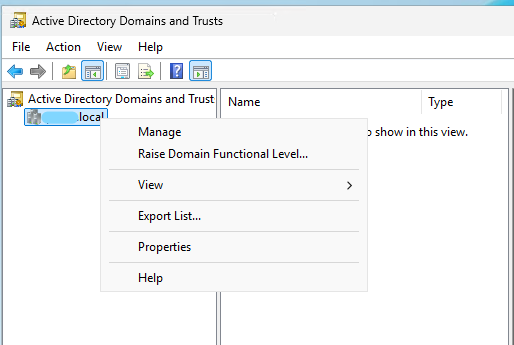
Open Active Directory Domains and Trusts on any domain controller. Right-click the domain name in the left pane and choose Raise Domain Functional Level.
The dialog shows the current domain functional level (Windows Server 2016 in this example) and a dropdown to select the target. Choose Windows Server 2025 and click Raise.
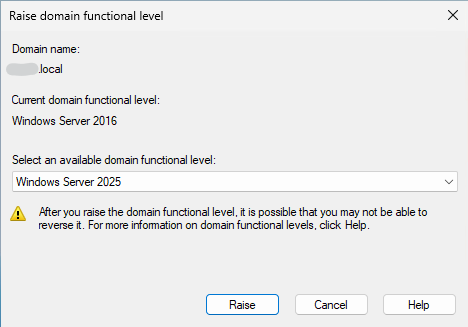
Windows warns that the change cannot be reversed. Confirm, and the new level replicates to all domain controllers automatically. Depending on your replication topology this can take a few minutes; you do not need to wait at the console.
Raising the forest functional level
Once the domain functional level is at Windows Server 2025 you can raise the forest. Back in Active Directory Domains and Trusts, right-click the Active Directory Domains and Trusts node at the top of the left pane (not the domain itself) and choose Raise Forest Functional Level. Select Windows Server 2025 and confirm.
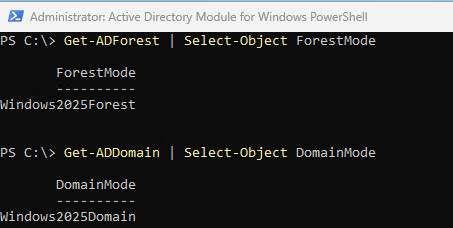
The forest functional level change also replicates automatically. You can verify both levels once replication completes:
Get-ADForest | Select-Object ForestMode
Get-ADDomain | Select-Object DomainMode
Both should return Windows2025Forest and Windows2025Domain respectively.
What changes after the raise
Raising to Windows Server 2025 enables the latest AD feature set, including improvements to Kerberos authentication, updated fine-grained password policy capabilities, and the ability for Windows Server 2025 DCs to fully enforce deprecations of older legacy protocols. It also removes the need to maintain any backward compatibility with pre-2025 DC behaviour, which simplifies future hardening and patching decisions.
Once done, document the change in your change log and update any runbooks that still reference Windows Server 2016 as the functional level.
