
Back in 2015, we published a PowerShell script that used Windows Server Backup’s built-in cmdlets and Send-MailMessage to fire off a formatted HTML status report after each backup job. That article held up surprisingly well, collecting over 70 comments and remaining one of the most-visited posts on this blog. A decade later, a lot has changed: Send-MailMessage is now officially deprecated, Windows Server 2025 is here, and transactional email APIs have become the reliable standard for programmatic mail delivery.
This article introduces WBJobReport.ps1 version 5.0, a ground-up rewrite that keeps the same goal (automated backup status emails) while modernising everything under the hood. The core change is the shift from SMTP credentials to the SendGrid v3 REST API, which means no more wrestling with SMTP relay settings, TLS mismatches, or plain-text passwords in script variables.
What Changed from v4
- Replaced
Send-MailMessagewith aSend-SendGridMailhelper that calls the SendGrid v3 REST API directly viaInvoke-RestMethod. No additional modules required. - Dropped the old SMTP variables (
$MailServer,$MailPort,$MailUser,$MailPassword) in favour of a single$SendGridApiKeyparameter. - Added
#Requires -Version 5.1andSet-StrictMode -Version Latestfor safer execution on modern hosts. - Refactored helper functions to use
[CmdletBinding()], typed parameters, and[PSCustomObject]@{}literals instead ofAdd-Member. - Updated HTML report styling for a cleaner look, with colour-coded result rows matching the screenshots above.
- Verified compatible with Windows Server 2025 and PowerShell 5.1.
Prerequisites
- Windows Server 2016 or later (tested through Windows Server 2025).
- PowerShell 5.1.
- The Windows Server Backup feature installed:
Install-WindowsFeature Windows-Server-Backup. - A SendGrid account with a verified sender address and an API key that has Mail Send permission.
- The script saved to a location accessible by the Scheduled Task service account, for example
C:\Scripts\WBJobReport.ps1.
Script Overview
All four settings are exposed as script parameters so you can pass them at runtime, store them in a secret manager, or simply edit the defaults at the top of the file.
[CmdletBinding()]
param(
    [string]$Company        = 'MyCompany',
    [string]$MailTo         = '[email protected]',
    [string]$MailFrom       = '[email protected]',
    [string]$SendGridApiKey = 'SG.xxx'   # Replace or pass via param / secret store
)
Sending Mail via the SendGrid REST API
The Send-SendGridMail function builds a minimal JSON payload matching the SendGrid v3 /mail/send endpoint and posts it with Invoke-RestMethod. No extra modules are needed beyond what ships with PowerShell 5.1.
function Send-SendGridMail {
    param(
        [string]$ApiKey,
        [string]$To,
        [string]$From,
        [string]$Subject,
        [string]$HtmlBody
    )

    $payload = [ordered]@{
        personalizations = @( @{ to = @( @{ email = $To } ) } )
        from    = @{ email = $From }
        subject = $Subject
        content = @( @{ type = 'text/html'; value = $HtmlBody } )
    } | ConvertTo-Json -Depth 6

    $params = @{
        Uri     = 'https://api.sendgrid.com/v3/mail/send'
        Method  = 'Post'
        Headers = @{
            Authorization  = "Bearer $ApiKey"
            'Content-Type' = 'application/json'
        }
        Body    = $payload
    }

    Invoke-RestMethod @params
}
Collecting Backup Job Data
The script loads the Windows Server Backup snap-in and calls Get-WBJob -Previous 1 and Get-WBSummary to retrieve the most recent job and its outcome. The result code is checked against zero: any non-zero value is treated as a failure and displayed in red in the email.
Add-PSSnapin Windows.ServerBackup -ErrorAction SilentlyContinue

$wbJob     = Get-WBJob -Previous 1
$wbSummary = Get-WBSummary

$resultCode  = $wbSummary.LastBackupResultHR
$resultLabel = if ($resultCode -eq 0) { 'Successful' } else { 'Failed' }

$startTime = $wbJob.StartTime
$endTime   = $wbJob.EndTime
$duration  = New-TimeSpan -Start $startTime -End $endTime

# Combine error description and detailed message if both are present
$errorParts = @($wbJob.ErrorDescription, $wbSummary.DetailedMessage) | Where-Object { $_ }
$errorMsg   = $errorParts -join " | "
The individual backup items (volumes, SystemState, BareMetalRecovery) are iterated and each is passed through the New-BackupItemRecord helper, which handles empty names and converts raw byte counts to a human-readable size string. The resulting list is converted to an HTML table fragment with ConvertTo-Html -Fragment and injected straight into the email body.
Setting Up the Scheduled Task
The recommended trigger is the Windows Backup operational event log rather than a fixed time schedule. This way the report fires immediately after each backup job completes or fails, regardless of how long the job ran. The event source is Backup in the Microsoft-Windows-Backup/Operational log.
# Scheduled Task settings
#
# Trigger:
#   Log:      Microsoft-Windows-Backup/Operational
#   Source:   Backup
#   Event IDs: 4,5,8,9,17,22,49,50,52,100,517,518,521,527,528,544,545,546,561,564,612
#
# Action:
#   Program:   powershell.exe
#   Arguments: -ExecutionPolicy Bypass -NonInteractive -File "C:\Scripts\WBJobReport.ps1"
#
# Optional: override defaults inline
#   Arguments: -ExecutionPolicy Bypass -NonInteractive -File "C:\Scripts\WBJobReport.ps1"
#              -Company "Acme Corp" -MailTo "[email protected]" -SendGridApiKey "SG.xxx"
Using event-based triggering means you get a report whether the job ran at its scheduled time, was triggered manually, or failed mid-way through. The broad list of event IDs covers all terminal states: success, failure, cancellation, and VSS errors.
Email Output
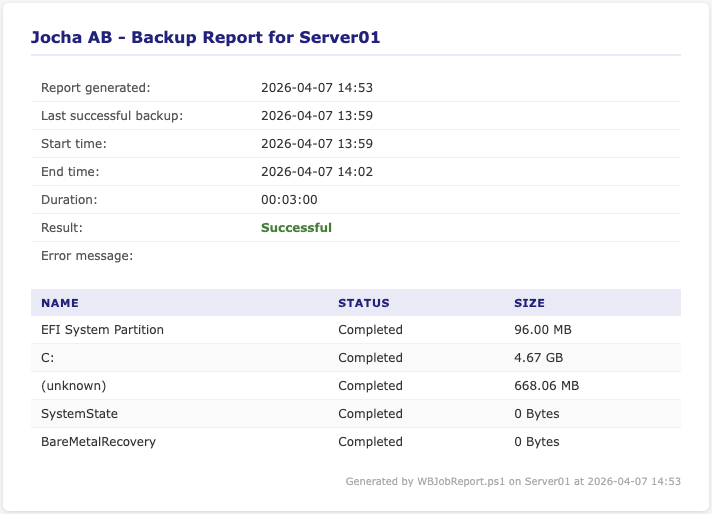
The script produces two distinct report styles. A successful backup shows each volume with its completed size. A failed backup shows the error message from Windows Backup alongside zeroed-out sizes for items that did not complete. The result field is colour-coded green for success and red for failure.
Successful backup report:
Failed backup report:
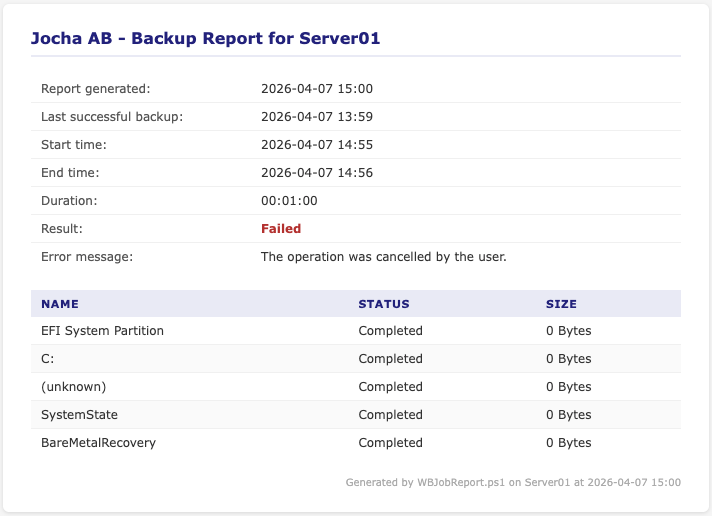
The email subject follows the format [Successful] MyCompany Backup Report - SERVER01 - 2026-04-07 14:02, making it straightforward to filter in any mail client or alert rule.
Getting the Script
Save WBJobReport.ps1 to C:\Scripts\, edit the four parameter defaults at the top of the file (or pass them as arguments to keep the script clean), and create the Scheduled Task using the event trigger settings above. No additional PowerShell modules are required beyond what ships with Windows Server.
If you are upgrading from v4.x, remove the old SMTP variables and replace the Send-MailMessage call with the new $SendGridApiKey parameter. The WBJob data collection, HTML table generation, and Scheduled Task trigger all work the same way as before.
We hope this updated script saves you some setup time and keeps your backup monitoring running reliably on Windows Server 2025. Drop a comment below if you run into issues or have suggestions for further improvements.
Full Script
Save the following as WBJobReport.ps1 and update the four parameters at the top to match your environment. No additional PowerShell modules are required.
#Requires -Version 5.1
<#
.SYNOPSIS
    Windows Backup Mail Report - Sends an HTML email report of the latest Windows Backup job.

.DESCRIPTION
    Version 5.0 - Updated 2026-04-07
    Queries the Windows Server Backup job history and sends a formatted HTML report
    via SendGrid. Supports both local and remote server reporting.
    Requires PowerShell 5.1 and the Windows Server Backup feature/snapin.

.PARAMETER Company
    Company name displayed in the report header.

.PARAMETER MailTo
    Recipient email address.

.PARAMETER MailFrom
    Sender email address.

.PARAMETER SendGridApiKey
    SendGrid API key for authenticated mail delivery.

.EXAMPLE
    .\WBJobReport.ps1

.EXAMPLE
    .\WBJobReport.ps1 -Company "Acme Corp" -MailTo "[email protected]" -SendGridApiKey "SG.xxx"

.NOTES
    Scheduled Task Trigger (recommended):
        Log:    Microsoft-Windows-Backup/Operational
        Source: Backup
        Event IDs: 4,5,8,9,17,22,49,50,52,100,517,518,521,527,528,544,545,546,561,564,612

    Scheduled Task Action:
        Program:   powershell.exe
        Arguments: -ExecutionPolicy Bypass -NonInteractive -File "C:\Scripts\WBJobReport.ps1"
#>

[CmdletBinding()]
param(
    [string]$Company        = 'MyCompany',
    [string]$MailTo         = '[email protected]',
    [string]$MailFrom       = '[email protected]',
    [string]$SendGridApiKey = 'SG.xxx'   # Replace or pass via param / secret store
)

Set-StrictMode -Version Latest
$ErrorActionPreference = 'Stop'
#region Helper Functions

function ConvertTo-HumanBytes {
    [CmdletBinding()]
    [OutputType([string])]
    param(
        [Parameter(Mandatory = $true)][long]$Bytes
    )

    if     ($Bytes -ge 1TB) { return '{0:N2} TB' -f ($Bytes / 1TB) }
    elseif ($Bytes -ge 1GB) { return '{0:N2} GB' -f ($Bytes / 1GB) }
    elseif ($Bytes -ge 1MB) { return '{0:N2} MB' -f ($Bytes / 1MB) }
    elseif ($Bytes -ge 1KB) { return '{0:N2} KB' -f ($Bytes / 1KB) }
    else                    { return "$Bytes Bytes" }
}

function New-BackupItemRecord {
    [CmdletBinding()]
    [OutputType([PSCustomObject])]
    param(
        [Parameter(Mandatory = $true)][AllowEmptyString()][string]$Name,
        [Parameter(Mandatory = $true)][AllowEmptyString()][string]$Status,
        [Parameter(Mandatory = $true)][long]$Bytes
    )

    [PSCustomObject]@{
        Name   = if ($Name)   { $Name }   else { '(unknown)' }
        Status = if ($Status) { $Status } else { '(unknown)' }
        Size   = ConvertTo-HumanBytes -Bytes $Bytes
    }
}

function Send-SendGridMail {
    [CmdletBinding()]
    param(
        [Parameter(Mandatory = $true)][string]$ApiKey,
        [Parameter(Mandatory = $true)][string]$To,
        [Parameter(Mandatory = $true)][string]$From,
        [Parameter(Mandatory = $true)][string]$Subject,
        [Parameter(Mandatory = $true)][string]$HtmlBody
    )

    $payload = [ordered]@{
        personalizations = @(
            @{ to = @( @{ email = $To } ) }
        )
        from    = @{ email = $From }
        subject = $Subject
        content = @( @{ type = 'text/html'; value = $HtmlBody } )
    } | ConvertTo-Json -Depth 6

    $params = @{
        Uri     = 'https://api.sendgrid.com/v3/mail/send'
        Method  = 'Post'
        Headers = @{
            Authorization  = "Bearer $ApiKey"
            'Content-Type' = 'application/json'
        }
        Body    = $payload
    }

    try {
        $result = Invoke-RestMethod @params
        Write-Verbose "Mail sent successfully. Response: $result"
    }
    catch {
        $webResponse = $_.Exception.Response
        if ($webResponse) {
            $statusCode = [int]$webResponse.StatusCode
        }
        else {
            $statusCode = 'N/A'
        }
        Write-Error "SendGrid API call failed (HTTP $statusCode): $_"
        throw
    }
}

#endregion
#region Data Collection

try {
    Add-PSSnapin Windows.ServerBackup -ErrorAction SilentlyContinue

    $computerName = $env:COMPUTERNAME
    $reportTime   = Get-Date -Format 'yyyy-MM-dd HH:mm'

    $wbJob     = Get-WBJob -Previous 1
    $wbSummary = Get-WBSummary

    if ($wbSummary.LastSuccessfulBackupTime) {
        $lastSuccess = $wbSummary.LastSuccessfulBackupTime.ToString('yyyy-MM-dd HH:mm')
    }
    else {
        $lastSuccess = 'Never'
    }

    $resultCode  = $wbSummary.LastBackupResultHR
    $resultLabel = if ($resultCode -eq 0) { 'Successful' } else { 'Failed' }

    $startTime = $wbJob.StartTime
    $endTime   = $wbJob.EndTime
    $duration  = New-TimeSpan -Start $startTime -End $endTime

    $errorParts = @($wbJob.ErrorDescription, $wbSummary.DetailedMessage) | Where-Object { $_ }
    $errorMsg   = $errorParts -join "\n"
}
catch {
    Write-Error "Failed to retrieve Windows Backup data: $_"
    exit 1
}

#endregion

#region Build Backup Item Table

$backupItems = foreach ($job in $wbJob) {
    foreach ($item in $job.JobItems) {
        if ($item.Name -eq 'VolumeList') {
            foreach ($sub in $item.SubItemList) {
                New-BackupItemRecord -Name $sub.Name -Status $sub.State -Bytes $sub.TotalBytes
            }
        }
        else {
            New-BackupItemRecord -Name $item.Name -Status $item.State -Bytes $item.TotalBytes
        }
    }
}

$itemsHtml = $backupItems | ConvertTo-Html -Fragment
$itemsXml  = [xml]$itemsHtml
$idAttr    = $itemsXml.CreateAttribute('id')
$idAttr.Value = 'items'
$itemsXml.table.Attributes.Append($idAttr) | Out-Null
$itemsTableHtml = $itemsXml.OuterXml

#endregion
#region Build HTML Report

$statusColor = if ($resultLabel -eq 'Successful') { '#2e7d32' } else { '#c62828' }

$htmlReport = @"
<!DOCTYPE html>
<html lang="en">
<head>
  <meta charset="UTF-8">
  <meta name="viewport" content="width=device-width, initial-scale=1.0">
  <title>$Company Backup Report - $computerName</title>
  <style>
    body      { font-family: Verdana, Geneva, Arial, Helvetica, sans-serif; font-size: 12px; color: #333; margin: 0; padding: 20px; background: #f5f5f5; }
    #Report   { max-width: 650px; background: #fff; border-radius: 6px; padding: 24px 28px; box-shadow: 0 1px 4px rgba(0,0,0,.12); }
    h3        { font-size: 16px; margin: 0 0 18px; color: #1a237e; border-bottom: 2px solid #e8eaf6; padding-bottom: 8px; }
    table     { width: 100%; border-collapse: collapse; margin-bottom: 20px; }
    th        { background: #e8eaf6; color: #1a237e; text-align: left; padding: 7px 10px; font-size: 11px; text-transform: uppercase; letter-spacing: .05em; }
    td        { padding: 6px 10px; border-bottom: 1px solid #f0f0f0; vertical-align: top; }
    tr:last-child td { border-bottom: none; }
    .label    { color: #555; width: 200px; }
    .status   { font-weight: bold; color: $statusColor; }
    .errormsg { white-space: pre-wrap; font-size: 11px; color: #555; }
    a         { color: #3949ab; text-decoration: none; }
    #items tr:nth-child(even) td { background: #fafafa; }
    footer    { font-size: 10px; color: #aaa; margin-top: 16px; text-align: right; }
  </style>
</head>
<body>
<div id="Report">
  <h3>$Company - Backup Report for $computerName</h3>

  <table id="summary">
    <tbody>
      <tr><td class="label">Report generated:</td>     <td>$reportTime</td></tr>
      <tr><td class="label">Last successful backup:</td><td>$lastSuccess</td></tr>
      <tr><td class="label">Start time:</td>            <td>$startTime</td></tr>
      <tr><td class="label">End time:</td>              <td>$endTime</td></tr>
      <tr><td class="label">Duration:</td>              <td>$duration</td></tr>
      <tr><td class="label">Result:</td>                <td class="status">$resultLabel</td></tr>
      <tr><td class="label">Error message:</td>         <td class="errormsg">$errorMsg</td></tr>
    </tbody>
  </table>

  $itemsTableHtml

  <footer>Generated by WBJobReport.ps1 on $computerName at $reportTime</footer>
</div>
</body>
</html>
"@

#endregion

#region Send Report

$mailSubject = "[$resultLabel] $Company Backup Report - $computerName - $reportTime"

Send-SendGridMail `
    -ApiKey   $SendGridApiKey `
    -To       $MailTo `
    -From     $MailFrom `
    -Subject  $mailSubject `
    -HtmlBody $htmlReport

Write-Host "Backup report sent to $MailTo" -ForegroundColor Green

#endregion